
03Now in testing · iPhone · Private by design
 That Key
That drawer full of mystery keys? Solved.
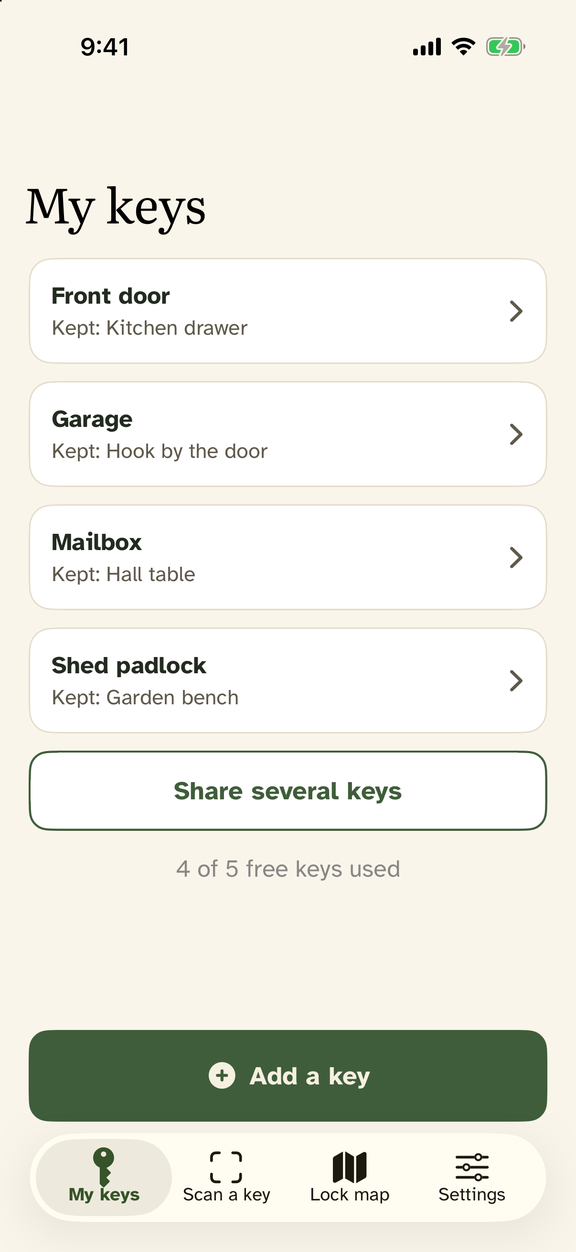
That Key is a password keeper for physical keys. Photograph and name every key you own — then scan any key you don’t recognize, and That Key tells you what it opens. All on your phone, never in the cloud.
Coming soon to the App Store
First 5 keys free · No account · No ads · iPhone (iOS 17+)
100%On your phone — no cloud
5Keys free to start
$0.99A year — cancel anytime
0Accounts or ads
A photo of a key is a key. We treat it that way.
- Everything stays on your phone — no cloud, no accounts, no ads
- Locked with Face ID; photos encrypted with Apple’s strongest file protection
- Saved photos are cropped to the key, so little of your home is kept
- Location for a lock is saved only when you ask, and only on your phone
- Scanning requires the physical key — pictures of keys are refused
Designed aging-eyes-first, pleasant for everyone
Most apps are built for 25-year-old thumbs. That Key is built from published research on how older adults actually use phones: large readable type, big buttons you can’t miss, plain words instead of jargon, and one decision per screen. No hidden gestures, no OK/Cancel riddles, no confetti.
When something goes wrong, the app says what to do next — never whose fault it was. And the person always makes the final call: That Key informs, it doesn’t insist.
$0.99A year, after 5 free keys — cancel anytime, no account
1Photograph each key — on its ring is fine
2Name it in one tap — Front door, Garage, Shed, Mailbox…
3Scan any mystery key — the cut pattern is matched on your phone
4Know what it opens — and where you keep its twin
What is That Key?
An iPhone app that works like a password keeper for physical keys. Photograph and name each key; later, scan a key you don’t recognize and That Key compares the blade’s cut pattern and appearance against your saved keys and tells you which one it is — entirely on your phone.
Is it safe to keep photos of my keys?
That Key treats key photos like credentials, not snapshots. They’re stored only on your device with Apple’s strongest file encryption, behind a Face ID lock, cropped to the key. No accounts, no cloud, nothing uploaded. And scanning requires the real key — a photo of a key is refused.
Who is it designed for?
Designed aging-eyes-first: large type, big buttons, plain words, one decision per screen, no hidden gestures. Perfect for older adults — and anyone with a drawer of unlabeled keys.
How much does it cost?
Your first 5 keys are free. After that, unlimited keys are $0.99 a year — it renews automatically, and you can cancel anytime in your phone’s Settings. You always have access to your saved keys, subscription or not; an active subscription is only needed to add new keys. No account, no ads.
When can I get it?
That Key is in private testing on iPhone (iOS 17 and later) and isn’t on the App Store yet. This page will link to the App Store the day it ships — check back soon.